A load board or broker quotes a rate. Whether that rate is good depends on things the quote doesn’t show: how far you drive empty to reach the pickup, what your truck costs per mile, and the fees taken out of the revenue. This guide explains how to turn those numbers into a breakeven rate per mile, how deadhead changes it, and how to compare loads without fooling yourself.
The examples use illustrative costs and rates, not market rates or typical costs. For the wider dispatch workflow, from carrier setup to the rate confirmation and the ETA, see how to dispatch a load.
What breakeven rate per mile means
Rate per mile (RPM) is the load’s revenue divided by its loaded miles. Three versions are worth knowing, and they answer different questions:
- All-in RPM = (linehaul rate + fuel surcharge) ÷ loaded miles. This is what the load pays per loaded mile.
- Net RPM = (revenue − dispatcher and broker or factoring fees) ÷ loaded miles. This is what’s left per loaded mile after fees.
- Breakeven RPM = (fees + truck cost + driver pay + tolls) ÷ loaded miles. This is what the load must pay per loaded mile to cover the trip’s costs.
Compare the first with the last. If the all-in RPM is higher than the breakeven RPM, the load makes a profit on the figures you entered. If it’s lower, it loses money. The two are equal exactly when the estimated profit is zero.
Breakeven RPM vs target RPM
Breaking even means the load pays for itself and nothing more. A target RPM, sometimes called a profit RPM, is the rate per loaded mile that covers your costs and leaves the profit you want from the trip. Breakeven is the floor below which you lose money; the target is the rate you’d like to be paid. How much profit to aim for is your decision, and this guide doesn’t suggest a figure.
Loaded miles and deadhead miles
Loaded miles are the miles driven with the freight on board, from pickup to delivery. Deadhead miles are the miles driven empty: to reach the pickup, or to reposition between loads.
Rates per mile are normally quoted on loaded miles, but the truck costs money on every mile it drives. Fuel, wear and the driver’s time don’t stop when the trailer is empty. So the way to treat deadhead is to keep it in the costs and keep it out of the denominator:
- Truck cost and driver pay are worked out on loaded + deadhead miles.
- All-in, net and breakeven RPM divide by loaded miles only.
That’s why more deadhead raises the breakeven rate even when the load’s rate doesn’t change. Take an illustrative load paying $1,500 for 500 loaded miles, with truck costs of $0.85 a mile, driver pay of $0.60 a mile and a 5% dispatcher fee. With no deadhead, its breakeven RPM is $1.60. With 250 deadhead miles to reach the pickup, it rises to $2.33, and the estimated profit falls from $700.00 to $337.50. The all-in RPM is $3.00 either way.
A second figure helps here: profit per total mile, the profit divided by all the miles driven, loaded and empty. It shows what the trip earns for every mile the truck actually covers: $1.40 without the deadhead and $0.45 with it.
Counting costs without counting them twice
A breakeven rate is only as good as the costs behind it. The two common mistakes are leaving a cost out and counting the same cost twice. Here is how the inputs fit together in the RPM & Profit Calculator:
| Input | What goes in it | Don’t also count |
|---|---|---|
| Linehaul and fuel surcharge | What the load pays you. Both count as revenue. | Fuel costs as revenue: the fuel surcharge is income, the fuel you buy is a cost. |
| Truck cost per mile | Fuel, maintenance, insurance, truck payment and other running costs, spread per mile. | Fuel or insurance as separate lines if they’re already in this figure. |
| Driver pay per mile | What the driver is paid per mile, on loaded and deadhead miles. | The same pay inside the truck cost per mile. |
| Tolls you pay | Tolls you pay and don’t get back. | Tolls the broker pays back: leave those out of both revenue and costs. |
| Dispatcher and broker or factoring fees | Percentages actually taken from this load’s revenue. | A broker’s margin you never see: if the rate you’re offered is already what you’ll be paid, there’s no broker fee to enter. |
Double counting changes the answer, not just the decimals. Suppose an owner-operator already includes their own pay in a truck cost of $1.45 a mile, then enters $0.60 a mile of driver pay as well. On the illustrative $1,500 load with 250 deadhead miles, the breakeven RPM jumps from $2.33 to $3.23, and a load estimated to make $337.50 now appears to lose $112.50. Neither figure is “the truth”; one of them just counts the driver twice.
Leaving costs out has the opposite effect. Add $60 of tolls the carrier pays to the same load, and the breakeven RPM rises to $2.45 while the estimated profit falls to $277.50.
Working out a cost per mile
Your truck cost per mile is your own figure, not a number to copy from someone else. One simple way to estimate it is to divide a year’s running costs by the miles driven in that year, both loaded and empty. For example, with purely hypothetical figures, $60,000 of costs over 100,000 miles is $0.60 a mile. Costs that don’t change with miles, such as a truck payment or insurance, make the per-mile figure higher in a year with fewer miles, so revisit it when your miles change.
Worked example: two loads compared
Here are two illustrative loads for the same truck, with the same costs as above: $0.85 a mile for the truck, $0.60 a mile for the driver, a 5% dispatcher fee, no broker fee, no fuel surcharge and no tolls.
| Load A | Load B | |
|---|---|---|
| Linehaul rate | $1,500.00 | $1,350.00 |
| Loaded miles | 500 | 480 |
| Deadhead miles | 250 | 30 |
| All-in RPM | $3.00 | $2.81 |
| Breakeven RPM | $2.33 | $1.68 |
| Estimated profit | $337.50 | $543.00 |
| Profit per total mile | $0.45 | $1.06 |
Figures calculated with the same maths as the Biberks RPM & Profit Calculator and shown as it shows them: revenue = linehaul + fuel surcharge; fees on revenue; truck cost and driver pay on loaded + deadhead miles; rates per mile on loaded miles.
Load A pays more in total and more per loaded mile, so on the quote alone it looks better. But a third of its miles are empty: 250 of 750, or about 33.3%, against about 5.9% for Load B. Those empty miles push Load A’s breakeven up to $2.33, leaving a margin of $0.67 a loaded mile. Load B’s margin is $1.13, so it earns about $205 more on these figures while the truck drives 240 fewer miles.
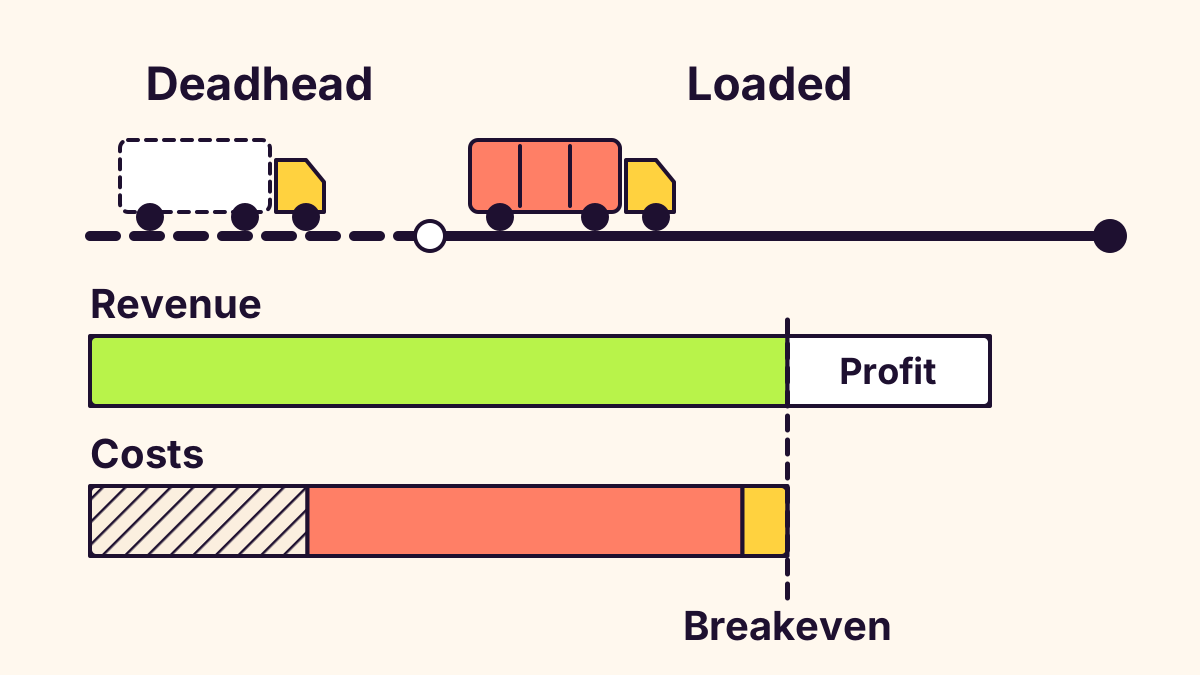
The hero diagram at the top of this guide is Load A drawn to scale: the dashed road is the deadhead, the hatched part of the cost bar is what those empty miles cost, and the gap between the breakeven line and the end of the revenue bar is the $337.50 profit.
Rate floor and target rate
When you negotiate, two numbers are useful: the lowest rate you could accept without losing money (a rate floor) and the rate you’d like to get (a target).
Why percentage fees need care
Dispatcher and broker or factoring fees are percentages of revenue. They grow when the rate grows and shrink when it shrinks. The calculator’s breakeven RPM includes the fees at the rate you entered, so it’s exact for that rate. If you accepted a lower rate, the fees would be lower too, and the true floor sits a little below the breakeven figure shown.
To find the floor directly, divide the costs that don’t depend on revenue by the share of revenue you keep after fees:
lowest revenue that breaks even = (truck cost + driver pay + tolls) ÷ (1 − fee share)
For Load A, the truck cost and driver pay come to $1,087.50 and the fee share is 5%, so the floor is $1,087.50 ÷ 0.95 = $1,144.74, or $2.29 per loaded mile, slightly below the $2.33 breakeven shown at the $1,500 rate. Enter $1,144.74 as the linehaul in the calculator and the estimated profit comes out at $0.00.
Setting a target rate
The same approach gives a target. Add the profit you want to the costs before dividing. If, purely as an example, you wanted $500 from Load A:
target revenue = (truck cost + driver pay + tolls + desired profit) ÷ (1 − fee share)
That’s ($1,087.50 + $500) ÷ 0.95 = $1,671.05, or $3.34 per loaded mile. Entered in the calculator, it gives an estimated profit of $500.00. If there’s a fuel surcharge, it counts towards the revenue, so subtract it to find the linehaul rate you need.
Questions to ask before you accept a load
The calculation tells you whether a load covers its costs on paper. These questions fill in what it can’t see:
- How many empty miles does it really take? Count the deadhead to the pickup, and think about where the delivery leaves the truck. A load that ends far from the next freight may mean a long deadhead afterwards.
- How long will it take? Two loads with the same profit aren’t equal if one ties the truck up for an extra day. Estimate the drive time, stops and buffer with the Trip / ETA Planner, and check that the timing fits the pickup and delivery windows.
- Is a fuel surcharge included, or is it all in the linehaul? Make sure you don’t count it twice or miss it.
- What are the accessorial and detention terms? The calculator doesn’t include extra charges such as detention pay, so leave out any you’re not sure of. Check the terms on the rate confirmation.
- When and how will you be paid? Payment terms and any quick-pay or factoring fee affect what you actually receive.
- Are there tolls on the route, and who pays them? Only tolls you pay belong in the costs.
- Does the freight suit the truck? Weight, equipment and any special handling should match what you can do safely and legally.
What the numbers can’t tell you
Every figure in this guide is an estimate built from the numbers entered. A few limits are worth keeping in mind:
- Your inputs decide the answer. The calculator doesn’t know your real costs, the real mileage or the route. Wrong costs or miles give a wrong breakeven.
- It isn’t a market rate. Nothing here says what a load should pay or what others are paid. The examples are illustrative.
- Time isn’t counted. Waiting at a facility, a slow route or a long gap before the next load don’t appear in a per-mile calculation.
- The verdict is a rule of thumb. The calculator labels a result “looks profitable” above $300 of profit and “low profit” above $0. That fixed threshold is the tool’s own rule of thumb, not a benchmark, and your own targets may differ.
- It isn’t financial advice. Use the figures as one input to your own decision, alongside your agreements and the advice of people who know your business.
To check the numbers yourself:
- Work out a load’s all-in, net and breakeven RPM and its estimated profit with the RPM & Profit Calculator. Enter Load A from the table to see a breakeven RPM of $2.33, then set the deadhead to 0 to see it fall to $1.60.
- Find your deadhead share with the Percentage Calculator, using “A is what % of B”: 250 of 750 total miles is about 33.3%.
- Estimate how long a load will take with the Trip / ETA Planner, so you can weigh profit against the time the truck is tied up.